

X-Design AI Agent Review: Logo Design, Posters, and Everyday Branding
X-Design AI Agent brings logo creation, poster design, branding assets, and video tools into one connected workspace for small teams and growing brands.
Branding work rarely stays tidy. A logo gets created for one purpose, then ends up everywhere else. Before long, small differences creep in. Colours shift, fonts change, and the boring layouts start to feel unrelated.
That problem shows up most often in small teams. Not because of bad ideas, but because design happens across too many tools. X-Design AI Agent is built around that reality. It tries to keep logo design, poster creation, and branding in the same place so decisions made early do not get lost later.
At first glance, it may look like a free AI logo maker. Spend more time with it, and the scope becomes clearer. The platform is less about producing one asset and more about keeping everything connected once that asset exists.
What is X-Design?
Most branding setups rely on separate tools. Logos live in one file. Posters are built somewhere else. Videos use yet another editor. Each handoff adds friction, and consistency depends on memory rather than structure.
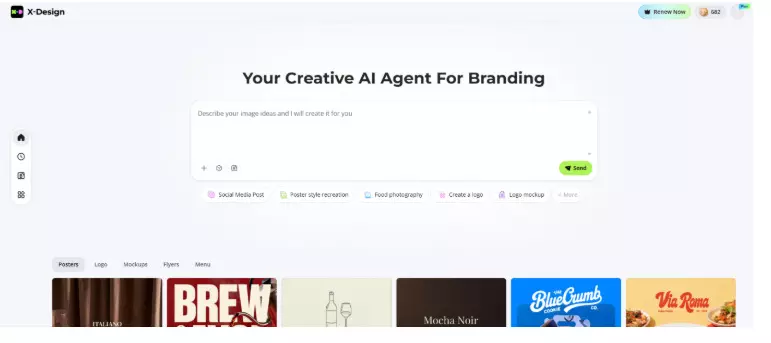
X-Design AI Agent takes a quieter approach. Instead of focusing on outputs, it focuses on the workspace. Logos, posters, and brand assets are present inside the same suite. Fonts and colors do not need to be reselected every time. Layout rules carry forward without being redefined.
This matters most for people managing design on their own. Founders, shop owners, and creators. The people are doing design alongside everything else.
Logo Design Inside X-Design AI Agent
Logo design is usually where the process starts. Inside X-Design AI Agent, this happens through short written prompts rather than rigid templates. A brand name, a few words about tone, and a general industry direction are enough to get going.
The first set of logos is not polished. That seems intentional. Some options lean heavily on typography. Others introduce symbols or abstract shapes. Seeing those differences early helps clarify what direction feels right without locking anything in.
Refinement does not feel like starting over. Adjusting wording or visual details shifts the output without wiping away progress.
Logo design highlights
- Prompt-driven logo concepts
- Multiple style directions are shown together
- Editable fonts and symbols
- Variations created for different uses
Where it works well
- Early brand exploration
- Quick iteration
- Simple refinements
Where it falls short
- Less control than full design software
- Results depend on how clearly ideas are described
Moving from Logos to Posters
Posters are often the first real test of a logo. Does it hold up outside a clean preview? Can it sit next to text, images, and offers without feeling awkward?
X-Design AI Agent handles posters through the same project space. The logo, colors, and fonts already exist, so poster layouts start from that foundation. Text and images remain editable, but the visual language stays consistent.
This functions like an online poster generator, though the experience feels less templated. Designs can be reused and adjusted instead of rebuilt from scratch.
Posters work for both print and digital use. Social formats sit alongside larger layouts without needing a separate setup.
Poster design features
- Brand-based layouts
- Editable content layers
- Reusable designs
- Print and digital formats supported
Practical strengths
- Faster updates
- Less visual drift
- Consistent look across campaigns
Branding As an Ongoing Process
Branding does not end after a logo and a few posters. Over time, more materials appear. Menus, banners, social graphics, signage. The challenge is not creating them, but keeping them aligned.
X-Design AI Agent handles this by storing brand rules inside the project itself. Fonts and colors remain consistent unless changed. Logos behave the same way across assets. New designs follow existing patterns automatically.
This does not eliminate creative decisions. It removes repetition.
Branding support inside the platform
- Centralised fonts and colours
- Consistent logo usage
- Shared layouts
- Asset storage in one place
Working with Prompts Instead of Panels
One noticeable aspect of X-Design AI Agent is how much it relies on written input. Rather than navigating complex menus, users describe what they want in plain language.
This changes the rhythm of design work. Instead of adjusting dozens of controls, ideas shift by adjusting phrasing. The result feels closer to describing a concept than operating software.
For people without a design background, this lowers friction. For experienced users, it speeds up exploration.
Video Tools Inside the Same Workspace
Brand visuals no longer stop at static images. Short videos now play a role even for small brands. X-Design AI Agent includes basic video generation and editing tools that work alongside its design features.
Logos created earlier can be placed into videos without reformatting. Posters often become the visual base for motion graphics. Colors and fonts remain consistent.
The video tools are not meant for complex production. They cover everyday needs. Short promos. Simple edits. Branded motion content.
Video-related features
- Short video generation
- Basic editing tools
- Logo placement in motion
- Brand consistency across formats
Who X-Design AI Agent Fits Best
This platform is not trying to replace professional design suites. Its strength lies elsewhere.
It suits:
- Small business owners creating their own visuals
- Startups building an initial brand presence
- Retailers running frequent promotions
- Creators working across formats
People needing deep technical control may still prefer traditional software. Those managing design as part of a broader workload tend to benefit more here.
Strengths and Limits in Real Use
Strengths
- One workspace for brand assets
- Reduced setup repetition
- Faster iteration
- Accessible without design training
Limitations
- Output quality depends on input clarity
- Some features sit behind a subscription
How it Compares to Traditional Workflows
Traditional workflows involve exporting, reimporting, and rebuilding. Each new asset requires setup. Consistency relies on discipline.
X-Design AI Agent reduces that overhead. Logos flow into posters. Posters inform video layouts. Brand rules stay attached. The result is not a perfect design, but steadier branding.
Final Thoughts
X-Design AI Agent works best when viewed as a workspace, not a generator. It connects logo design, poster creation, and branding in a way that reflects how small teams actually work.
The platform does not replace creative thinking. It removes friction around execution. For people juggling design alongside other responsibilities, that difference matters.
Used consistently, X-Design AI Agent helps brands grow without losing their visual thread.





