

Essential Features You’ll Find in an AI Photo Enhancer
he use of an AI Photo Enhancer makes the whole editing process not only easier but more user-friendly as well.
image for illustrative purpose
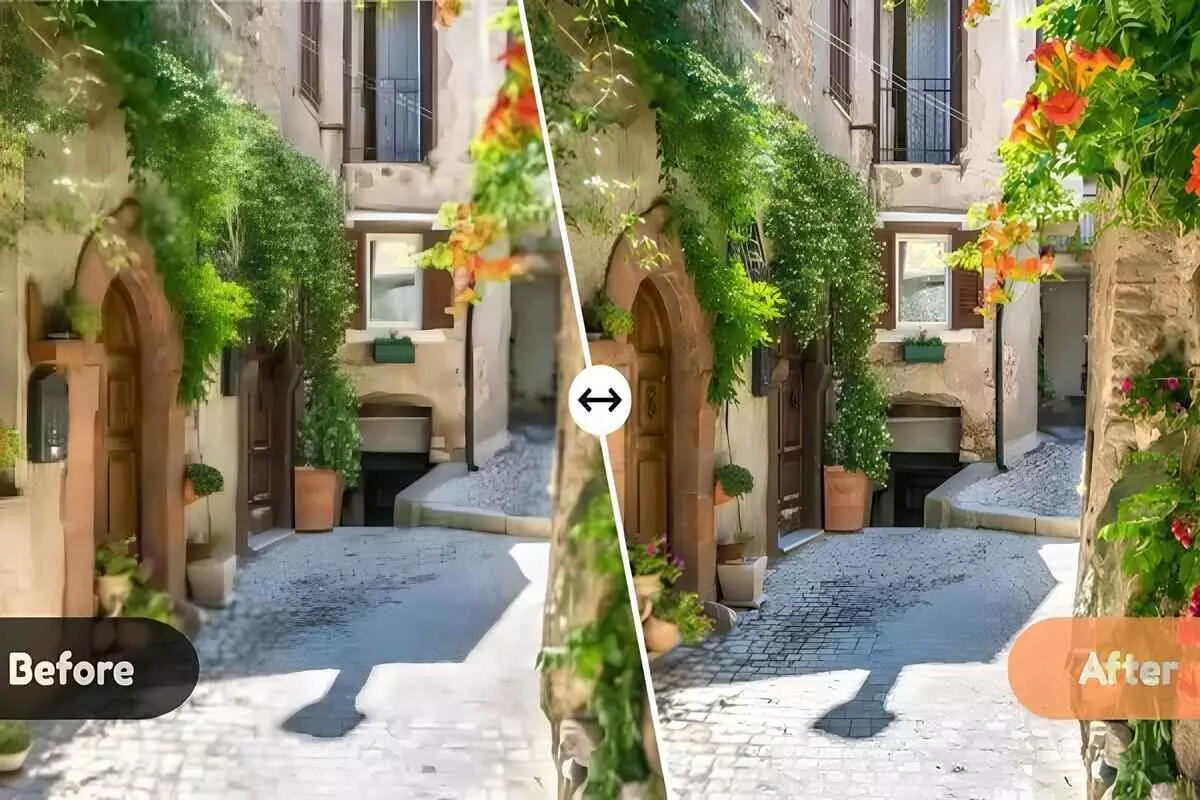
Nowadays, the editing programms have gotten faster and more accurate, which totally changed the way creators were uniting their photos. They depend on ML models that discern visual patterns and apply sophisticated refinements instantly. Thus, the users get results that were previously possible only with high-end software or professional retouching. The technology cuts down the image processing time dramatically while still producing clean and high-quality images.
The majority of photographers have automated solutions for their work because they are easy to use and very dependable. The developers of these systems are always working on them by supplying them with updated training data and algorithms. The outcome is improved contrast, sharpness, and visual balance for a wide variety of photos. The use of an AI Photo Enhancer makes the whole editing process not only easier but more user-friendly as well.
What Powers an AI Photo Enhancer?
These tools for improvement are powered by sophisticated neural networks that gain knowledge from millions of pictures, spotting the patterns in exposure, sharpness, and color to figure out what the photo needs. The realness of the photo is preserved very well while the quality is improved through the careful computation of each adjustment, and faster processing makes it possible for different factors to be analyzed at the same time.
The following points will explain how an AI Photo Enhancer applies these intelligent features to achieve consistent and impressive results.
1. Automatic Image Enhancement
Automatic enhancement goes through all the features of the picture and with just one command it applies different improvements at once. It takes care of light, dark and middle parts of the picture to make it look well balanced and this saves users time who would have otherwise done it all by themselves one by one. It is very good for making quick changes where time is not enough.
Moreover, the tool enlarges the clarity of the whole picture but keeps the natural details at the same time. The tool does not produce very bright or very saturated results; instead, it uses the scene’s context for analysis. The image now looks cleaner and more professional. Its reliability has made it one of the features that are most frequently seen.
2. Super-Resolution Upscaling
The super-resolution technique enlarges the images but keeps every detail sharp and clear. It brings back the lost textures and enhances the tiny features which the ordinary resizing methods generally lose. This results in the situation that even the low-resolution or old pictures appear to be clean and crisp. Furthermore, users are able to check the file sizes in a very convenient manner by utilizing a mb to kb converter before the exporting or sharing of their photos.
This feature is extremely beneficial for printing, cropping, or taking images in higher resolution for different uses. It creates more powerful edges and recovers details that normal upscaling cannot restore. Even severely compressed images can gain a better visual quality and depth. Therefore, the super-resolution tool has become an essential tool not only for the photographers but also for the digital creators.
3. Skin Smoothing and Retouching
The tool’s precise analysis of skin and facial structure makes portrait editing much less challenging. It works on the skin by removing imperfections, toning down the patches, and erasing the fine lines with a soft touch that maintains the natural texture. This prevents the plastic appearance that is the common result of the classic methods applied for smoothing. With this, users can easily get portrait results comparable to those of a professional studio.
Advanced retouching techniques also focus on preserving pores and fine details. This maintains realism even with significant corrections. The system adapts to various skin types and lighting scenarios to ensure smooth results. These abilities are a major strength of an AI Photo Enhancer used for portraits.
4. Background Removal
Background removal isolates subjects with precision, even along complex edges. It separates hair strands, clothing textures, and other fine details without harsh outlines. This helps users create clean cutouts for design, advertising, or social content. It eliminates the need for manual tracing tools.
The algorithm also handles soft backgrounds and transparent elements smoothly. It fills missing areas intelligently to minimize post-editing work. Creators can easily place subjects in new environments with minimal cleanup. This makes it highly valuable for product imagery and creative compositions.
5. Object Removal
Object removal eliminates distractions by replacing them with realistic textures. The tool analyzes the surroundings to rebuild areas seamlessly. Whether removing signs, people, or random unwanted objects, it maintains the photo’s overall structure. This improves the visual flow of the image.
It also blends colors and patterns to ensure the repaired area appears untouched. This reduces editing time for outdoor, travel, or product photos. The feature is ideal for cleaning up busy scenes or refining compositions. Users can effortlessly enhance storytelling through simpler and cleaner visuals.
6. AI-Powered Filters
Artificial intelligence filters boost the overall atmosphere by smartly changing color, tone, and texture. They rely on the picture's subject matter rather than applying the same preset over it. This leads to the most authentic and significant transformations. The purpose of every filter is to support the feeling, the fashion, or the artist's imagination.
These filters also maintain clarity by analyzing light, contrast, and color harmony. They avoid the heavy artificial look that standard filters sometimes create. Creators can craft cinematic, warm, cool, or artistic styles easily. Applying filters becomes more effective when guided by an AI Photo Enhancer that interprets the scene.
7. Detail Enhancement
Detail enhancement brings out the textures without adding noise or roughness. It primarily deals with areas that require more definition like cloth patterns, sceneries, or hair. The method of sharpening chosen retains the crispness of the entire picture but still preserves the softness in the right places. The end product is a well-calibrated and good-looking picture.
The processor highlights the lesser details and makes them stronger in a balanced way. This makes it hard for one to notice the artificial look that often comes with sharpening done through strong processing. Even a photo that is a little bit out of focus can have its shape and dimension restored. The feature is particularly beneficial for macro and wildlife photography.
8. Face Recognition
Face recognition detects facial elements accurately to apply targeted enhancements. It identifies eyes, lips, skin texture, and overall structure with precision. This ensures smooth editing without distorting expressions. The feature is essential for portrait consistency.
It can do this also by recognizing many faces from different angles or at different distances. This feature comes in handy for group photos where everyone has to get equal and balanced corrections. Low-light or low-resolution portraits would also have the same clarity as the vibrant and bright ones. The outcome is a visually appealing and charming image that seems to be retouched.
9. Batch Processing
Batch processing is a great way to edit photos in bulk by applying the same adjustments to a lot of images. This is very useful, for instance, in product photography, event coverage, or social media posts. It cuts down on editing time noticeably, since it takes care of all the monotonous tasks via automation. Also, the users get a chance to have a matching look for all the images.
The capability of an AI Photo Enhancer makes the batch edit process more intelligent and versatile. It processes every single picture separately while applying the same settings. This guarantees that the images are corrected properly but at the same time, the visual team is not disturbed. The huge amount of editing done is now very simple, speedy, and extremely productive.
10. Low-Light Enhancement
Low-light enhancement improves dark images, but it does not introduce too much grain at the same time. The algorithm recognizes noise patterns and applies corrections according to them. Thus, clarity in night or indoor pictures is restored. Besides, colors look more vivid and balanced as well.
The technology increases shadow parts but at the same time takes care that the lightest areas do not get overexposed. It keeps things real even with very bright images. This is particularly the case for travel, event, and mobile photography. It provides the user with the required confidence when dealing with difficult light situations.
11. Lens Correction
Lens correction repairs the defects that come along with the lens distortion which results in the bending of lines and uneven shapes. It makes architecture straight, adjusts perspective and, in general, accuracy is being restored. This comes in especially useful while working with the wide-angle lens. Each of such fixes is a move in the right direction of enhancing the quality of the overall composition.
An AI Photo Enhancer goes along with the system in the curing of chromatic aberration and vignetting. It takes away from the picture the distractions that come in the form of purple fringes or darkened corners. The corrections make the photos look like they have been worked on by a professional. Automatic improvements in technical skills are even advantageous for the beginners.
12. Smart Cropping
Smart cropping investigates the go-to subject and changes the framing to improve the composition. It lists the best places according to visual balance. Thus, the distracting void is removed and the point of interest is shown nicely. The process of cropping turns out to be smooth and natural.
The system adapts to different aspect ratios for various platforms. It ensures essential elements remain visible in every version. This makes formatting easier for social media, printing, or digital branding. Smart cropping enhances storytelling by refining structure.
AIEnhancer: The Ultimate Choice
AIEnhancer is a powerful tool that integrates intelligent automation with artistic control perfectly. It processes the images at high speed and without losing naturalness and detail. This, of course, makes it suitable for beginners, professionals, and everyday creators.
The platform is able to output high-quality results no matter the genre of photography used - portrait, landscape, and product photography. It changes its approach in accordance with different styles but still does not require frequent manual corrections. For those users who are after consistent performance and fineness in their results, the AIEnhancer is a superb option.
Conclusion
The present-day picture enhancement applications are very powerful and sophisticated, so they deliver nothing but great results. The application of these tools in the performing arts will disappear at any time as will the human intervention in the process. The user's ability to produce neat and gripping pictures is enhanced by every feature of the program. The pace of progress in technology keeps on becoming faster and more accurate.
A picture enhancer with artificial intelligence helps artists to be using the advanced editing tools that are quite easy to operate. It takes an ordinary photo and makes it more than ever engaging simply by the use of the technology of automation. Thus, professional quality editing is now open to everyone, no matter their photography skills. The future of digital enhancement is already suggesting the opening up for even more artistic expression.





